Hydetown: A Modern Script Font for Web Design
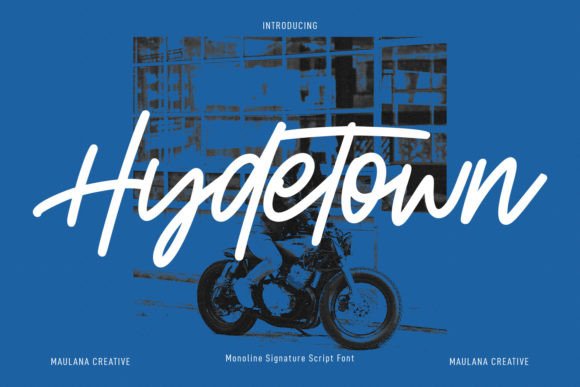
While working on a boutique online store project, I found myself searching for a font that could add personality without sacrificing clarity. Hydetown, part of the Script Amp collection, caught my eye with its clean, modern feel and versatile style. It’s the kind of script font that feels fresh and professional, perfect for digital projects where both aesthetics and usability matter.
Testing Hydetown in a hero section was the first step. The font’s subtle curves and consistent stroke weights made it easy to read even at larger sizes. It didn’t overpower the background or compete with the image behind it. Instead, it added a soft, elegant touch that felt right for a brand focused on style and simplicity.
One of the things I appreciate about Hydetown is how it balances creativity with practicality. It’s not overly ornate, which means it works well in a variety of contexts. Whether I was placing it over an image banner or using it for a product landing page headline, it maintained a level of readability that I needed for user engagement.
For a coaching website, I used Hydetown for the main heading and subheadings. The font’s smooth flow gave the site a friendly, approachable vibe without looking too casual. It paired well with a simple sans serif for body text, creating a clear visual hierarchy that guided users through the content effortlessly.
When designing a portfolio homepage, I experimented with Hydetown for the logo text. The font’s natural rhythm made it feel handcrafted yet polished, which aligned with the creative nature of the site. It also worked well as a decorative accent in call-to-action buttons, adding a touch of flair without distracting from the primary message.
Readability is always a concern when using script fonts, especially on mobile screens. Hydetown handled this well—its characters were distinct enough to be legible even at smaller sizes. I tested it on dark backgrounds and light ones, and it maintained good contrast in both cases. When placed over image overlays, it still stood out without requiring additional styling.
For a blog redesign, I used Hydetown in the header and featured post titles. The font’s consistency helped create a cohesive look across the site. It also complemented the overall design without feeling out of place. I noticed that users were more likely to scan the content when the typography was visually appealing and easy to follow.
Pairing Hydetown with other fonts was another consideration. I tried it alongside a serif font for a more editorial feel and with a sans serif for a cleaner, more modern look. Both combinations worked well, showing the font’s adaptability. It’s a great choice for designers who want to add a unique touch without complicating their layout.
Hydetown’s versatility extends beyond just headings and logos. I used it for short phrases on a product landing page, where it added a sense of authenticity and creativity. It also worked well in social media graphics and promotional banners, helping to reinforce the brand’s identity across different platforms.
Before finalizing the font for a client project, I checked the available styles, webfont formats, and licensing options. Hydetown comes in multiple weights and alternates, making it easy to use for different design needs. Its multilingual support was a bonus, especially since the client’s audience included non-English speakers.
As a web designer, I value fonts that are both beautiful and functional. Hydetown fits that description perfectly. It’s a premium script font that brings a modern, polished look to any digital project. Whether you’re building a small business website, a course sales page, or a creative portfolio, Hydetown offers the flexibility and clarity needed to create a strong online presence.
From a usability standpoint, Hydetown helps establish trust and professionalism. Its clean lines and balanced structure make it feel reliable, which is essential for brands looking to connect with their audience. It’s a font that doesn’t demand attention but still stands out in the right way.
Overall, Hydetown has become one of my go-to fonts for web design. It’s a great example of how a well-crafted script can enhance a digital layout without compromising readability or performance. For anyone looking to elevate their website’s typography, Hydetown is definitely worth considering.
Whether you're working on a boutique online store, a coaching website, or a digital brand kit, Hydetown offers the right mix of style and substance. It’s a font that feels modern, yet timeless, and it’s designed with real web projects in mind.